1

CUSTOMIZE YOUR ORDER AND ADD TO CART

Safe Our services are completed entirely through normal gameplay. We do not use mods, mod menus, bot lobbies, exploits, cheats, or any other unauthorized methods.
SELECT EMBLEMS
๐Ÿ›’ Cart 0
    Your cart is empty.
    2

    Select Platform

    checkout

    -
    APPROXIMATE COMPLETION
    -
    ACTIVE BOOSTERS
    38

    EXPRESS ORDER (+30%)

    STREAMING (+5$ or 15%)

    PAY HALF NOW, HALF AT 50%

    APPEAR OFFLINE (FREE)

    specific booster

    store credit (0$)

    store credit

    quantity discount

    coupon code

    total
    ... $
    ... $
    USD $
    USD $
    EUR €
    GBP ₤
    CAD $
    AUD $

    Login and checkout to get in cashback* !

    HIGHEST COMPLETION RATES

    100% of orders get completed


    UNBEATABLE STARTING TIME

    Average starting time 11 minutes


    LIGHTNING SPEED BOOSTING

    9 hours on average per day

    BO2 Emblems Boost FAQ

    BO2 Emblems Boost is a Black Ops 2 service focused on helping you unlock Emblem Editor items, customization options, and account progress connected to emblems. Emblems are custom cosmetic images displayed on your playercard beside your name and profile information in Multiplayer.
    After checkout, we assign a professional Black Ops 2 booster to your order. The booster works on the required account progress, levels, challenges, or unlocks needed for the selected Emblem Editor options and keeps you updated through your personal order tracking page.
    Emblems are custom images shown on your Black Ops 2 playercard. Players create them in the Emblem Editor by combining shapes, symbols, colors, text-like elements, and multiple layers into a custom design.
    No. BO2 emblems are purely cosmetic. They do not increase damage, improve matchmaking, unlock weapons, change stats, or provide any gameplay advantage.
    An emblem is the smaller custom image or logo shown on your playercard. A calling card is the larger background banner behind your name and stats. BO2 Emblems Boost focuses on emblem-related customization and unlocks, while calling cards are handled through BO2 Calling Cards Boost.
    Usually, BO2 Emblems Boost is about unlocking the shapes, symbols, layers, and customization options used in the Emblem Editor rather than unlocking pre-made finished emblems. If you want a specific design created, contact Live Chat and we can check whether a custom emblem request is possible.
    We can help unlock eligible Emblem Editor options and related account progress, including shapes, symbols, layers, design elements, and any available emblem-related items that require Multiplayer progression, leveling, or challenge completion.
    Custom emblem creation may be possible depending on the requested design, available Emblem Editor items, account unlocks, and booster availability. You can provide a reference idea such as a clan logo, flag, character, face, symbol, or personal design, and Live Chat can confirm whether it can be recreated.
    Yes, simple clan or team logo emblems can be requested as a custom order when the required Emblem Editor items are available. The final result depends on BO2โ€™s editor limits, layer count, available shapes, and the complexity of the design.
    Yes. We can review custom requests for flags, symbols, achievement-style designs, simple faces, personal emblems, and other BO2 playercard designs. Complex images may need to be simplified because the Emblem Editor is limited to in-game shapes and layers.
    No. We do not create offensive, hateful, explicit, abusive, or prohibited emblem designs. Custom emblem requests must follow platform rules, game rules, and our service standards.
    We can help with available and boostable Emblem Editor unlocks, but full availability depends on your account, platform, game version, current progression, and whether specific items are still obtainable. Contact Live Chat if you want us to review your current emblem unlocks before ordering.
    Some emblem-related options may require account levels, Multiplayer progress, or other unlocks before they can be used. If your account is low level, we may recommend BO2 Account Leveling first or combine leveling with your Emblems Boost order.
    Some BO2 customization items may be tied to progression, challenges, or account status. If the emblem item you want requires a specific challenge, the booster will work on the required objective through normal Multiplayer gameplay.
    Most emblem work depends on the in-game Emblem Editor and your account progress. If a specific item or design requires DLC, purchase-related content, or platform entitlement, your account must already own that content before we can use it.
    Yes. If you already have partial Emblem Editor progress, the booster only needs to work on the remaining eligible unlocks or custom emblem setup. Contact Live Chat if you want a custom quote based on your current account progress.
    Yes, but low-level accounts may not have every required item, level, class setup, or customization option available. The booster may need to complete account progress first before the requested emblem unlocks or design options become available.
    If the order requires Multiplayer progress, some stats such as kills, score, wins, or match history may naturally change during the boost. Emblems themselves are cosmetic and do not directly affect your gameplay stats.
    No. Emblems and calling cards are different playercard items. This service focuses on BO2 emblems and Emblem Editor customization. If you need challenge cards, banners, or calling card completion, order BO2 Calling Cards Boost instead.
    No. BO2 Emblems Boost does not include weapon camo challenges unless specifically added as a custom request. If you want Gold, Diamond, or weapon camo progress, order BO2 Camo Boosting instead.
    Weapon leveling is not included by default unless it is required for the selected emblem-related progress or added as part of a custom package. For pure weapon XP progress, use BO2 Weapon Leveling Boost.
    Prestige Boosting is not included by default. If the emblem-related customization you want requires higher account progression or Prestige access, we can combine BO2 Emblems Boost with BO2 Prestige Boosting as a custom order.
    BO2 Emblems Boosting is usually completed as a piloted service, meaning the booster plays on your account to unlock the required progress or set up the requested emblem options as efficiently as possible.
    BO2 Emblems Boost is usually easier as a piloted service. If you want to play yourself while receiving help or guidance, contact Live Chat and we can check whether a Self-Play option is possible for your selected goal.
    You need Black Ops 2 on a supported platform and access to online Multiplayer. For piloted orders, you must provide correct login details and access to two-factor authentication if it is enabled. Some emblem options may require specific account levels, progression, or unlocks.
    Yes. BO2 Emblems Boosting is available on supported PlayStation, Xbox, and PC platforms. Availability may depend on the selected emblem goal, account access, platform, matchmaking, and current online functionality.
    Most BO2 Emblems Boosting orders start quickly after checkout. Start time depends on your selected emblem goal, account level, current unlocks, platform, and booster availability.
    Completion time depends on the selected goal. Simple emblem setup or minor unlocks are usually faster, while account progression, challenge-based unlocks, or custom emblem designs can take longer.
    Yes. If the booster is playing on your account, you should stay offline so the session is not interrupted. If you need access, message your booster through the tracking page and they will pause safely.
    No. BO2 Emblems Boosting is completed through normal gameplay and normal account progression without mod menus, hacks, cheats, bot lobbies, or third-party unlock tools.
    Yes. Your order is handled by verified Call of Duty boosters with strict account safety guidelines. Your login details, personal information, emblem progress, and custom requests are handled privately.
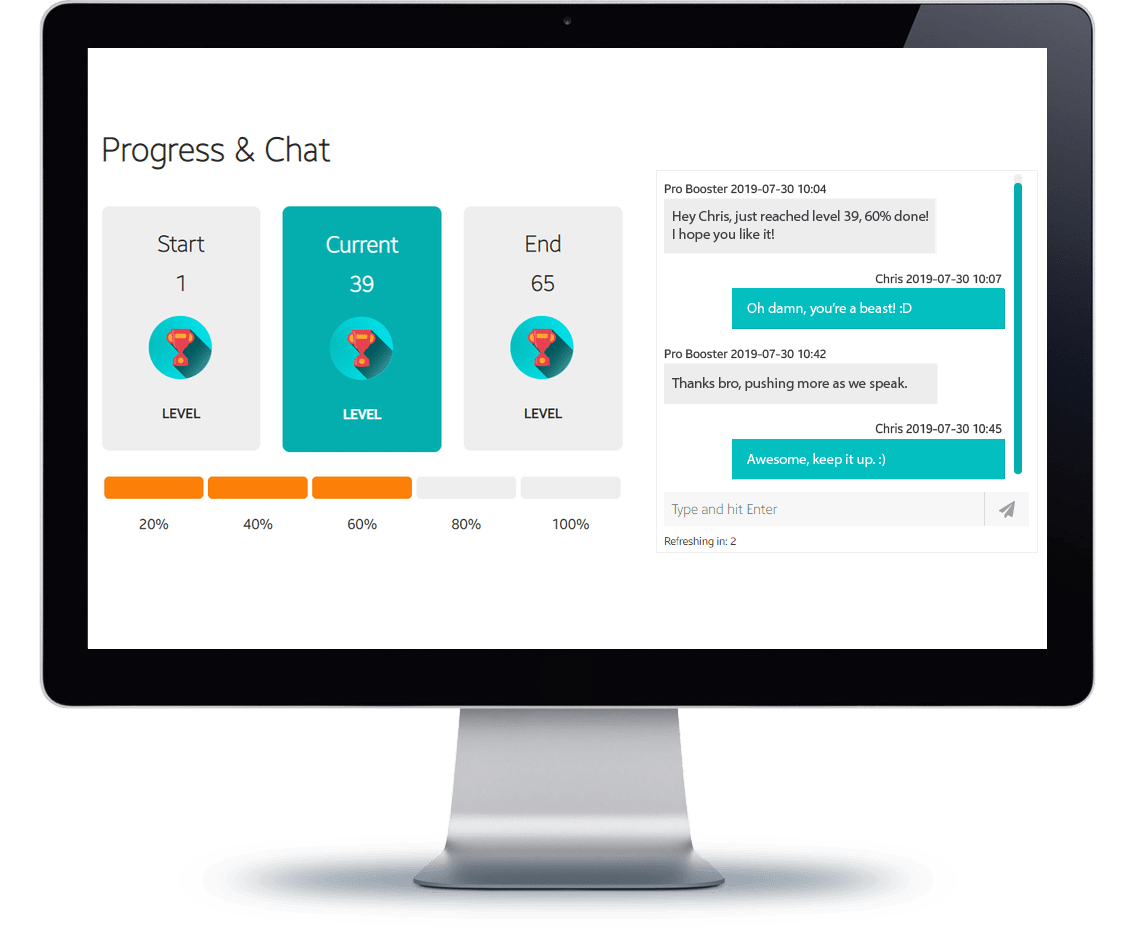
    Yes โ€” every BO2 Emblems Boost order includes a personal tracking page where you can follow progress updates and chat directly with your booster.
    Yes. You can use your personal order tracking page to communicate directly with your booster, leave emblem notes, share design references, provide updates, or ask questions during the service.
    Yes. Select the streaming option if you want to watch the booster complete your account progress, unlock requirements, or custom emblem setup live.
    Yes. You can update notes, change emblem goals, pause the order, or contact support through the tracking page or Live Chat. If the order includes custom emblem design, large changes may affect completion time.
    We accept PayPal, all major credit cards, Skrill, Klarna, iDeal, Alipay, Neteller, Paysafecard, and Bitcoin.

    Don't just take our word for it, see what our customers say about us

    How does BO2 Emblems Boost work?

    BO2 Emblems Boost helps you unlock Emblem Editor items, customization options, and account progress connected to emblems in Call of Duty: Black Ops 2. Emblems are the small custom images shown on your playercard beside your name and profile information in Multiplayer.

    Black Ops 2 emblems are created inside the Emblem Editor by combining shapes, symbols, colors, text-like elements, and multiple layers. They are purely cosmetic and do not provide gameplay bonuses, but they are one of the best ways to personalize your BO2 profile with clan logos, flags, characters, faces, symbols, or custom designs.

    Unlock Emblem Editor items and customization options.

    BO2 Emblems Boosting is focused on unlocking the shapes, symbols, layers, and customization options used inside the Black Ops 2 Emblem Editor. Some emblem-related options may require account progression, Multiplayer activity, leveling, or challenge completion before they can be used.

    Instead of grinding the required progress yourself, a professional Black Ops 2 booster works on the needed unlocks through normal Multiplayer gameplay. If your account is missing specific Emblem Editor items, the booster can help complete the required progress so you have more tools available for custom playercard designs.
    BO2 Emblems Boost and Emblem Editor unlocks

    Emblems are different from calling cards.

    In Black Ops 2, an emblem is the smaller custom image or logo displayed on your playercard. A calling card is the larger background banner shown behind your name, rank, and stats. This service focuses on BO2 emblems, Emblem Editor customization, and emblem-related unlocks.

    If you want challenge cards, banners, weapon mastery cards, scorestreak cards, Career cards, Prestige cards, or Nuclear Killer, those belong to BO2 Calling Cards Boost instead. If you want weapon camos, Gold, Diamond, or weapon challenge progress, use BO2 Camo Boosting.

    Custom BO2 emblem design requests.

    If you already have the required Emblem Editor items unlocked, we can also review custom emblem design requests. Examples include clan or team logos, flags, symbols, achievement-style icons, simple characters, faces, and personal playercard designs.

    Custom emblem creation depends on the available shapes, symbols, colors, layers, account unlocks, and the complexity of your reference. Complex images may need to be simplified because the BO2 Emblem Editor is limited to in-game design elements. Offensive, explicit, hateful, or prohibited emblem designs are not accepted.
    Custom BO2 emblem design service

    Custom packages based on your current account progress.

    Not every BO2 Emblems Boost order needs the same work. Some customers only need minor Emblem Editor unlocks, while others need account leveling, challenge-based progress, or a custom emblem setup after the required items are available.

    If you already have partial progress, Live Chat can review your current account status and create a custom BO2 Emblems Boost package. This is the best option if you need specific editor items unlocked, want a custom emblem recreated, or are not sure whether your account already has the required shapes and symbols.

    Your accountโ€™s privacy and security come first.

    HIGH-END SSL
    SECURITY

    All data you submit is encrypted with SSL protection to help keep your account information and order details secure.

    VPN PROTECTED
    BOOSTING

    For piloted BO2 Emblems Boost orders, boosters can use region-matched VPN protection to help keep the login process consistent and secure.

    SILENT
    BOOSTERS

    Our boosters work discreetly and never share your personal details, account information, emblem progress, or custom design requests with anyone.

    What happens after I buy BO2 Emblems Boost?

    Once you complete your purchase, your order is immediately listed for our professional Black Ops 2 boosters. You will also receive a confirmation email with a link to your personal order tracking page.

    On the tracking page, you can update login details, leave notes about the Emblem Editor items or custom design you want, share your current progress, and chat directly with your assigned booster. The booster will review your account, check the required unlocks, complete the needed progress, and update you as the order moves forward.

    Returning customers get more benefits.

    Every completed order helps increase your Boosting Factory account level, unlocking larger discount coupons for future services, including BO2 Emblems Boost, BO2 Calling Cards Boost, BO2 Camo Boosting, BO2 Weapon Leveling, BO2 Nuke Boosting, Prestige Boosting, Unlock All, KD Boosting, and other Call of Duty boosts.

    Referring friends earns both you and your friend store credit when they purchase. We appreciate loyal customers and reward them with better savings, useful perks, and a smoother experience on every new order.
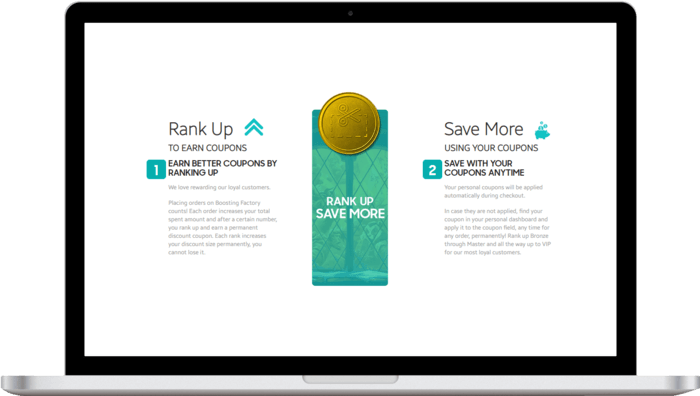
    BO2 Emblems Boost rewards and discounts

    Need help?

    get in touch

    approximate
    completion time

    2 - 3 days

    ACTIVE BOOSTERS

    38

    store credit (0$)

    Total:...

    USD $
    USD $
    EUR €
    GBP ₤
    CAD $
    AUD $
    You've blocked notifications. Please click on the lock pad icon in the address bar, then set "Notifications" permission to "Ask(default)". Refresh the page.
    Notifications are already enabled! If you don't see them check your browser and OS settings again.