Modern Warfare 4 launches with 12 Core 6v6 maps, alongside Gunfight on Kill Block, large-scale Ground War battles, and a mix of classic and new Multiplayer modes. If you want to know which maps are included and how the different modes work, this guide covers the full original lineup.
You'll find every confirmed launch map, the main game modes, and explanations of the new features. We'll also explain how Warzone and DMZ fit into MW4 without confusing their maps with the Core Multiplayer roster.
| TABLE OF CONTENTS MW4 Maps and Modes Guide Jump to the section you're interested in: |
MW4 Launch Maps and Modes Overview
Modern Warfare 4's Multiplayer offering includes 12 standard 6v6 maps, the changing Kill Block battlefield, and Ground War maps designed for bigger fights. The 12-map count refers only to Core Multiplayer, not other game experiences.The launch mode selection covers respawn modes, tactical modes, Ground War, Party Modes, and Hardcore variants. Hijack and Inflation are two new modes players first experienced during the Beta, while the full game expands the selection further.
- Core Multiplayer: 12 maps built for traditional 6v6 combat.
- Kill Block: A modular battlefield with more than 500 possible configurations and Gunfight formats including 3v3 and 10v10.
- Ground War: Large-scale maps for infantry and vehicle combat, including Combat Outpost.
- Party Modes: Gun Game and Drop Zone are part of the announced launch selection.
- Hardcore: Variants are confirmed for Team Deathmatch, Domination, Hardpoint, Kill Confirmed, Free for All, and Search & Destroy.
For the original official map and mode announcement, see Infinity Ward's Multiplayer overview.
All 12 MW4 Core Multiplayer Maps
Six maps appeared during the Open Beta, and six more complete the original 12-map Core 6v6 launch roster. All 12 are new Multiplayer environments, although Kill Block includes sections inspired by older Modern Warfare locations.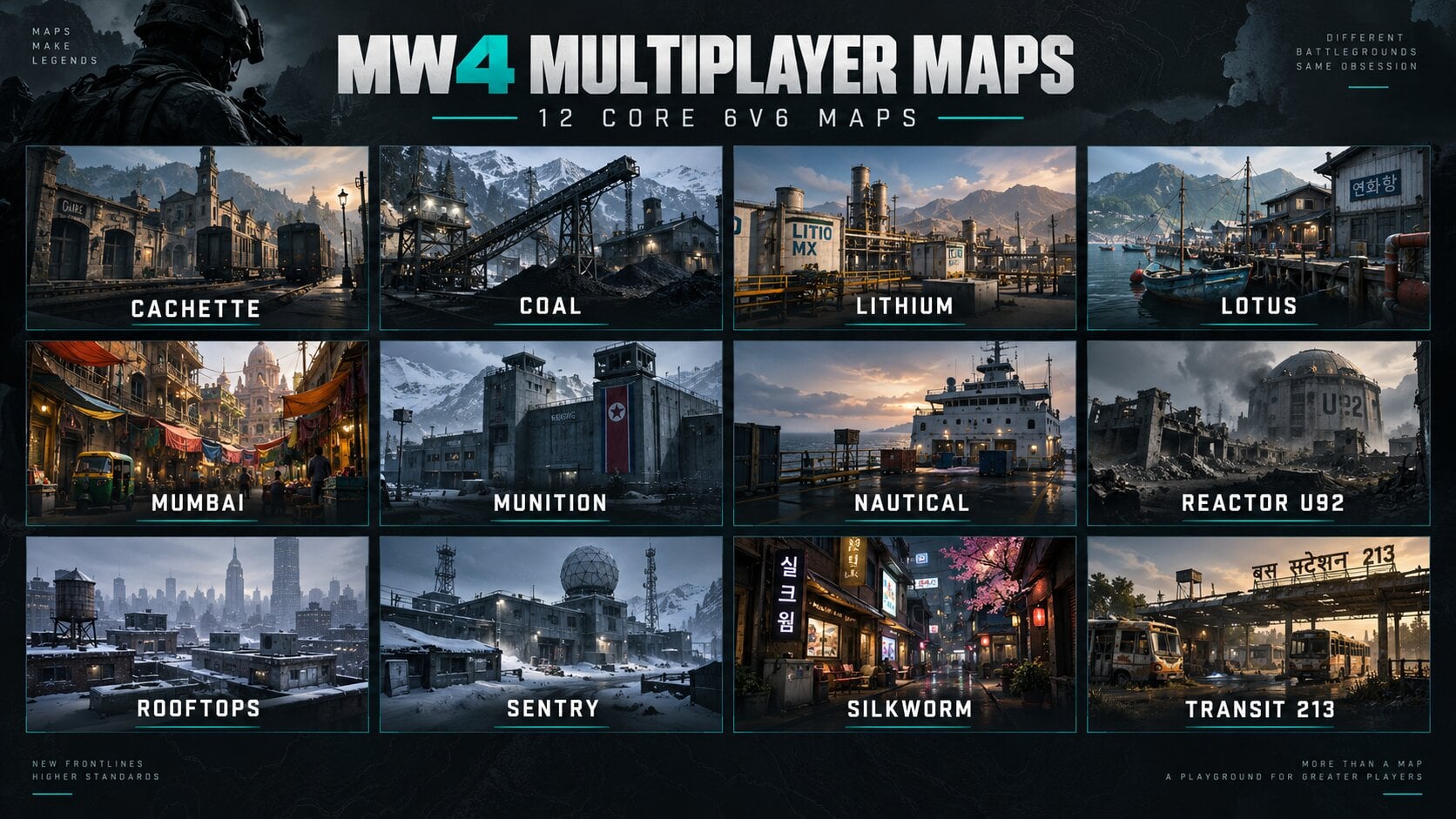
| Map | Location | Main Setting |
|---|---|---|
| Cachette | France | Rail terminal hideout with warehouses, garages, and containers |
| Coal | Former Soviet industrial site | Mountain coal plant, broken smokestack, and ore chutes |
| Lithium | Mexico | Industrial lithium refinery with long lanes and garage doors |
| Lotus | Korea | Battle-damaged fishing village with streets, docks, and houses |
| Mumbai | India | Dense housing district, Victorian market, and railway |
| Munition | North Korea | Military command facility with hangars, crane, and skybridge |
| Nautical | South Korea | Ferry deck with narrow routes, fires, and wreckage |
| Reactor U92 | Korea | Damaged reactor complex around a containment pool |
| Rooftops | New York, USA | Snowy hotel rooftops, walkways, and interior rooms |
| Sentry | North Korea | Snow-covered base with barracks, garages, and generators |
| Silkworm | South Korea | Shopping district, storefronts, alleys, and subway entrance |
| Transit 213 | India | Overgrown bus depot with tight lanes and exposed crossings |
Featured playlists can change which maps appear together, but the original launch roster remains a useful reference. If you're learning the maps, focus on the terrain and routes below instead of short-lived playlist rotations.
Six New MW4 Maps Added for Launch
These are the six maps that expand the original Beta selection to 12 Core maps. Their settings and landmarks come from Infinity Ward's launch overview, while the gameplay suggestions are based on the terrain described.Coal
Coal takes place at the ruins of a Soviet-era coal processing plant in a remote mountain region. A fallen smokestack, ore chutes, processing buildings, and a polluted river give the map a worn industrial feel.Expect a mix of open approaches and tighter fights around machinery and buildings. Keep an eye on the higher industrial structures before crossing exposed ground.
Mumbai
Mumbai is built around a fugitive's hideout in a dense Indian residential neighborhood. A Victorian market sits near tightly packed housing blocks, with a railway running through the district.The dense layout should reward players who check side streets and entrances instead of running straight through the busiest route. Short-range weapons may be useful inside buildings, while the rail corridor creates different angles.
Munition
Munition is an active North Korean military command facility centered on a large ammunition depot. It features hangars, monitoring rooms, a skybridge, crane, water tower, and other military structures.The skybridge and taller structures are important landmarks to recognize early. Watch overhead sightlines when pushing between hangars, and use cover before moving through exposed exterior areas.
Nautical
Nautical takes place aboard a South Korean ferry leaving a major conflict zone at dawn. Fires and wreckage cover parts of the ship's decks, turning a normal passenger vessel into a combat space.The ship setting makes routes and deck access especially important. Learn how to change levels and avoid predictable straight-line pushes through narrow passages.
Reactor U92
Reactor U92 is a damaged Korean nuclear reactor facility. Electrical destruction has torn through its large, curved command room, while a boiling containment pool marks the center of the disaster.Use the structures around the command room to identify safer routes and lines of sight. Players holding strong positions around its central space may punish anyone who crosses without checking angles.
Sentry
Sentry takes place at a North Korean military base during a snowstorm. Combat moves through a maintenance garage, generator room, substation, central command area, and damaged barracks.The weather gives Sentry a different look from the other maps. Use recognizable buildings to navigate, and expect close fights around the base's indoor entry points.
The Six MW4 Maps From the Beta
All six Beta Core maps are part of the original full-game map lineup. Their layouts introduced the mix of vertical movement, compact streets, open lanes, and interactive routes found across MW4.Cachette
Cachette is a covert hideout near a French rail terminal. Cobblestone streets, shipping containers, garages, rooftops, and compact interiors create multiple ways to flank an objective.Move between exterior cover and upper routes to avoid repeating the same attack. Cachette works well for players who can quickly switch between close-range fights and mid-range angles.
Lithium
Lithium is a damaged lithium processing facility in rural Mexico. Industrial equipment and open lanes create room for mid-range weapons, while interior spaces force more direct fights.The map also has interactive garage doors that players can raise or partly close. A partly closed door can leave room to slide underneath, so even a blocked-looking entrance may still be a route into the fight.
Lotus
Lotus is a Korean fishing village hit by an amphibious assault. Shops, homes, a hostel, boathouse, gardens, streets, and damaged vehicles give players different combat ranges within a small area.Watch the long street before moving through the village, then use the buildings for safer rotations. It suits flexible loadouts that can handle both tight rooms and longer outdoor engagements.
Rooftops
Rooftops takes place around New York's snow-covered Hotel Times West. HVAC platforms, skylights, exterior walkways, a greenhouse, boiler room, and smaller rooftop spaces create several layers of combat.Vertical routes are central to the map. Use MW4's mantle and climbing systems to reposition, but watch for enemies covering paths between rooftops.
Silkworm
Silkworm is a busy South Korean shopping district built around a subway entrance. Convenience stores, apartments, alleys, and city streets create regular close-to-mid-range encounters.Most fights stay closer to street level than on Rooftops. Fast handling, good corner checks, and knowledge of shop entrances can help when fighting for control of the center.
Transit 213
Transit 213 is an overgrown bus depot in western India. Old buses split the center into tight paths, while a gas station, repair shop, construction areas, and surrounding buildings create longer angles.Use buses as cover, but watch for enemies looking down the gaps between them. Assault Rifles can work on the longer routes, while SMGs help when fights move inside the bus lanes.
All MW4 Multiplayer Modes at Launch
Modern Warfare 4's launch roster goes beyond the Beta's seven Core modes. It includes Free for All, Counter Attack, Gunfight, Party Modes, and large-scale Ground War alongside familiar objective playlists.| Mode | Format | Basic Objective |
|---|---|---|
| Team Deathmatch | Core 6v6 | Score points through enemy eliminations. |
| Domination | Core 6v6 | Capture and hold objectives to build team score. |
| Hardpoint | Core 6v6 | Control a hill that moves around the map. |
| Kill Confirmed | Core 6v6 | Collect enemy Dog Tags and deny your own. |
| Free for All | Solo Core | Compete against every other player for eliminations. |
| Counter Attack | Core respawn | New mode named in the launch roster; full scoring rules were not detailed in the announcement. |
| Inflation | Core 6v6 | Earn and collect cash while targeting rich opponents. |
| Hijack | Core 6v6 | Carry and plant a Data Spike at the opposing Comm Station. |
| Search & Destroy | Core 6v6 | Plant or defend bomb sites in single-life rounds. |
| Gunfight | 3v3 on Kill Block | Win short rounds with shared, randomized loadouts. |
| Gunfight 10v10 | 10v10 on Kill Block | Team-based Gunfight with a larger player count. |
| Gun Game | Party Mode | Progress through weapons by earning kills. |
| Drop Zone | Party Mode | Fight to control an active zone and earn battlefield rewards. |
| Combat Outpost | 24v24 Ground War format | Capture and reinforce Outposts for points and team support. |
Hardcore modes: Activision specifically lists Hardcore versions of Team Deathmatch, Domination, Hardpoint, Kill Confirmed, Free for All, and Search & Destroy. Featured playlists may group or rotate these modes without changing the original launch offering.
The announcement also refers to additional large-scale Ground War modes without naming all of them. This table lists the named modes rather than guessing at unconfirmed playlist names or changing score limits.
New MW4 Game Modes Explained
The biggest departures from standard Team Deathmatch and Domination are Hijack and Inflation. Both change what players must do between eliminations, while Counter Attack and other announced modes broaden the range of playstyles.What Is Hijack in MW4?
Hijack is a 6v6 objective mode built around a single Data Spike. Teams fight to pick up the Spike and move it to the enemy Comm Station, where the carrier can plant it to start earning points.The carrier can run with the Spike, throw it forward, or pass it to a teammate. Defenders must reach the planted device and defuse it before the attackers earn the full detonation reward.
Protecting the carrier is essential because carrying the Spike changes how they use their normal Lethal Equipment input. Good teamwork can matter more than winning isolated gunfights.
What Is Inflation in MW4?
Inflation is a cash-based 6v6 mode where eliminated enemies drop money. Collecting that money increases your team's score, but losing a fight can also mean dropping part of what you've earned.Players carrying large cash amounts become High Value Targets, making them worth hunting and protecting. You can chase enemy cash, defend the richest teammate, or deny opponents access to money on the ground.
Overtime cash multipliers can change the result quickly, so teams cannot always protect a narrow lead by avoiding fights. Inflation rewards players who know when to push and when to keep their earnings safe.
What Is Counter Attack?
Counter Attack is listed by Infinity Ward among MW4's new launch respawn modes. The original launch mode announcement did not explain its full scoring rules, so it should not be confused with Hijack, Inflation, or Search & Destroy.What About Collateral and Frontline?
Infinity Ward also previewed Collateral, a 5v5 single-life mode where teams earn in-match cash to buy gear, and Frontline, a 6v6 respawn mode where teams deploy from their own base. In Frontline, eliminations outside your team's base are worth more points.These modes were described during the Multiplayer reveal, but neither appears in the same article's explicit launch-mode checklist. For that reason, they are treated here as announced modes with unclear day-one playlist status, not guaranteed additions to the table above.
Search & Destroy, Free for All, Gun Game and Drop Zone
Search & Destroy remains a one-life mode where attackers try to plant a bomb and defenders try to stop or defuse it. Free for All removes teams, so every elimination counts toward your own result.Gun Game changes your weapon as you progress through eliminations, testing your ability to adapt to different gun types. Drop Zone focuses the fight around an active zone, mixing objective control with powerful rewards.
Kill Block and Gunfight in MW4
Kill Block is a modular combat map inside the Westbridge Training Facility. Instead of staying the same from match to match, its layout changes by combining large sections called Slabs.Three Slabs form each map combination, with two outer sections and a central combat space. Infinity Ward has confirmed more than 500 possible configurations, including sections inspired by classic Modern Warfare maps such as Crash, Highrise, and Shoot House.
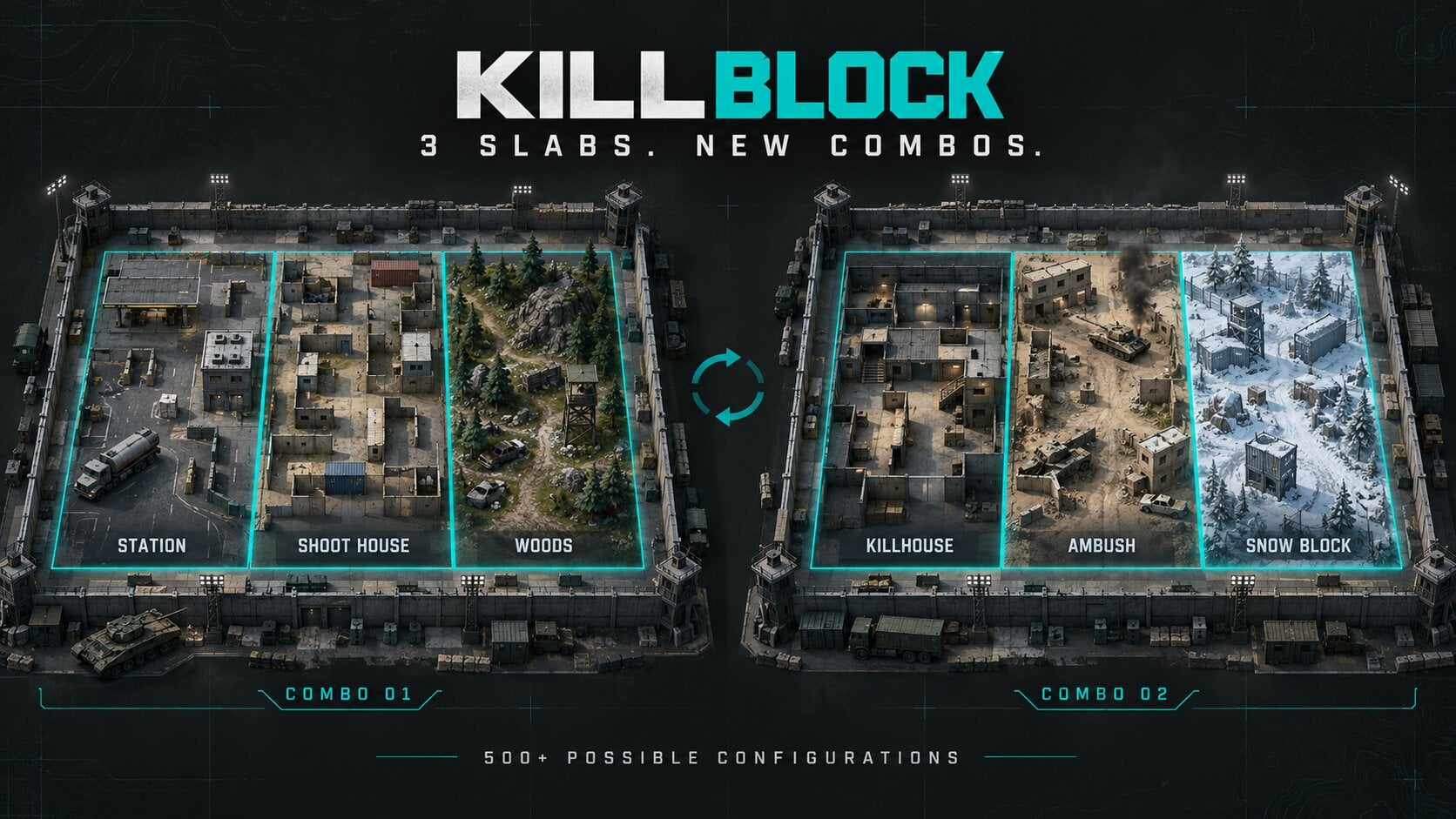
In Gunfight, the layout and shared weapon loadout change after two rounds. Teams must adapt their routes and sightlines while trying to eliminate the other team or win the round through the overtime objective.
- 3v3 Gunfight: Smaller teams, short rounds, and identical randomized equipment for both sides.
- 10v10 Gunfight: The larger version, with more players fighting across Kill Block's changing layouts.
- Future mode support: Kill Block was built to support additional Core modes beyond Gunfight, but those modes are not all part of the original launch roster.
Because Kill Block changes its geometry, memorizing one fixed route is less useful than learning how the Slabs fit together. Watch for new sightlines after each change instead of pushing based on the previous round's layout.
MW4 Ground War Maps and Combat Outpost
Ground War brings vehicles and large infantry teams into maps that are much bigger than the 12 Core 6v6 environments. The best-known new mode is Combat Outpost, which was tested in a 24v24 format during the Beta.Teams capture Outposts to earn points and open new spawn locations. They can then reinforce their positions to unlock extra support such as local UAV coverage, JLTV airdrops, and Light Tanks.
Capturing an Outpost is only the beginning. Holding and improving a position can help your team control the next part of the map rather than giving up territory as soon as the objective changes.
Imjin Farmlands
Imjin Farmlands is a large rural battlefield in the Hajin region, with fields, waterways, farms, roads, rail lines, and a prominent mill. Open ground gives vehicles and long-range weapons room to operate.Use terrain, buildings, and vehicles when moving between objectives. The mill is an important landmark because it overlooks much of the surrounding farmland.
Wolves Stadium
Wolves Stadium is a denser urban battlefield with buildings, transit routes, tunnels, rooftops, hillsides, and narrow streets. Its vertical layout creates more chances for infantry to flank enemies above or below street level.Look for ladders, ascenders, pipes, and other traversal routes when a ground-level push is blocked. Teams that control key buildings can create strong angles over nearby Outposts.
These are the two Ground War maps publicly shown during the Beta. Infinity Ward has also announced more large-scale content for the full game, but its original Multiplayer overview does not give a complete named launch list of Ground War maps.
MODERN WARFARE 4 BOOSTING Spend Less Time Grinding Weapon Levels Explore our MW4 Weapon Leveling service for weapons, attachments, and account progression. Explore MW4 Weapon Leveling →
Warzone Zodiac, DMZ Hajin and Campaign Maps
Some of MW4's largest and most recognizable locations belong to other experiences, not the 12-map Core Multiplayer lineup. Keeping them separate makes the map count easier to understand.Is Zodiac a Modern Warfare 4 Multiplayer Map?
Zodiac is a Warzone Resurgence map set around a South Korean weapons and drone manufacturing site. Its 10 named points of interest include Admin, Solar, Old Mines, Dispatch, Trackline, R&D, Depot, Furnace, Sentinel, and Cooling.The map includes train routes, rooftops, industrial buildings, and underground paths, but it is not one of the 12 Core 6v6 launch maps. Zodiac was playable in the MW4 Beta and is scheduled for the game's Season 1 Warzone rollout, rather than the October 23 Core Multiplayer launch.
See our MW4 Warzone Zodiac guide for its locations and Resurgence features.
What Is Hajin in MW4 DMZ?
Hajin is the much larger Exclusion Zone used by MW4 DMZ, a PvPvE extraction experience separate from Core Multiplayer. Players enter the map, complete objectives, fight AI and rival players, recover valuable items, and try to extract.Hajin is also planned as a Battle Royale map for the Warzone Season 1 update. Read our complete MW4 DMZ guide for its locations, missions, progression, and extraction mechanics.
Do Entrenched and the Mobility Course Count as Maps?
Entrenched is a Campaign mission featuring a large assault near a nuclear power station, not a Multiplayer arena. The Mobility Course was a separate Beta training experience designed to teach MW4 movement techniques, and it does not count toward the 12 Core maps either.MW4 Maps and Modes FAQ
How many Multiplayer maps does Modern Warfare 4 have at launch?
Modern Warfare 4 launches with 12 Core 6v6 maps. This count does not include Kill Block, Ground War maps, DMZ Hajin, or Warzone Zodiac.What are all 12 MW4 launch maps?
The maps are Cachette, Coal, Lithium, Lotus, Mumbai, Munition, Nautical, Reactor U92, Rooftops, Sentry, Silkworm, and Transit 213.Which maps were added after the MW4 Beta?
The six maps not playable in the Beta are Coal, Mumbai, Munition, Nautical, Reactor U92, and Sentry. The original six Beta maps also belong to the launch roster.Does Modern Warfare 4 have map voting?
Map voting was tested during the Beta. The original launch map announcement does not spell out exactly which full-game playlists use voting, so the available voting options depend on the playlist's rules.Is Kill Block part of the 12 Core maps?
No. Kill Block is a separate modular battlefield used for Gunfight and built for additional mode support. It has more than 500 possible configurations.Does MW4 have 10v10 Gunfight?
Yes. Gunfight 10v10 is in the announced launch lineup alongside smaller-team Gunfight on Kill Block.Is Search & Destroy in MW4?
Yes. Search & Destroy is included in the Multiplayer launch lineup, with a Hardcore variant also confirmed.Does MW4 have Hardcore modes?
Yes. The original launch announcement confirms Hardcore for Team Deathmatch, Domination, Hardpoint, Kill Confirmed, Free for All, and Search & Destroy.What new game modes are in MW4?
Hijack, Inflation, Counter Attack, and Combat Outpost appear in the official new-mode launch lineup. Infinity Ward has also described Collateral and Frontline, although their exact day-one playlist status is less clear.Are there remastered Multiplayer maps in MW4?
Infinity Ward describes the 12 original Core maps as new Multiplayer environments. Kill Block is a separate experience that can include Slabs inspired by older Modern Warfare maps.Is Zodiac available in MW4 at launch?
Zodiac belongs to the Season 1 Warzone content rollout, not the 12-map Multiplayer launch roster. It was previously playable in the Open Beta as a Resurgence map.What is the difference between Ground War and DMZ?
Ground War is large-scale team-based Multiplayer focused on fighting and controlling objectives. DMZ is a separate extraction experience focused on completing objectives, collecting loot, surviving threats, and extracting from Hajin.
Top 50
Get your MW4 rewards now.