Call of Duty: Modern Warfare 4 launches on October 23, 2026, but PC players do not need to wait until launch day to start downloading it. Activision has confirmed that the MW4 PC preload begins on October 15 at 9:00 AM PT, giving players time to install it before Campaign Early Access on October 16, DMZ Early Access on October 20, and the full launch.
This guide covers the confirmed MW4 preload time, Campaign and DMZ Early Access, launch timing, download size, PC requirements, and how to prepare on PS5, Xbox Series X|S, Steam, Battle.net, Xbox on PC, and Nintendo Switch 2.
|
Table of Contents
MW4 Preload & Launch Guide
Jump to the section you're interested in:
|
MW4 Preload Date & Time
Activision has officially confirmed the first Modern Warfare 4 launch preload details.MW4 preload begins on PC on October 15, 2026 at 9:00 AM PT. This applies to players who digitally pre-purchase Modern Warfare 4 on Xbox on PC, Battle.net, or Steam, according to Activision's official PC launch announcement.
Here is when the confirmed PC preload begins in major time zones:
| Region | MW4 PC Preload Time |
|---|---|
| US West Coast (PT) | October 15, 9:00 AM |
| US East Coast (ET) | October 15, 12:00 PM |
| United Kingdom (BST) | October 15, 5:00 PM |
| Central Europe (CEST) | October 15, 6:00 PM |
| Japan (JST) | October 16, 1:00 AM |
| Sydney (AEDT) | October 16, 3:00 AM |
The preload gives PC players roughly one day to prepare before Campaign Early Access on October 16, five days before DMZ Early Access on October 20, and more than a week before the October 23 full launch.
Console preload timing has not yet been officially announced. Activision has confirmed Campaign and DMZ Early Access for eligible digital buyers on consoles, but has not published a specific full-game preload date for PS5, Xbox Series X|S, or Nintendo Switch 2 yet.
We will update this section when the remaining preload times are confirmed.
What Time Does Modern Warfare 4 Release?
Modern Warfare 4 officially launches on Friday, October 23, 2026.Activision's PC launch information states that the full game becomes available at midnight local time on October 23.
Modern Warfare 4 is launching on:
- PlayStation 5
- Xbox Series X|S
- Xbox on PC
- Steam
- Battle.net
- Nintendo Switch 2
There is no PS4 or Xbox One version of Modern Warfare 4.
Digital preorder owners can access the Campaign on October 16 and the full DMZ mode on October 20. Multiplayer is scheduled for the October 23 full launch.
MW4 Campaign Early Access Starts October 16
Modern Warfare 4 Campaign Early Access begins on Friday, October 16.The benefit is available to players who digitally preorder or pre-purchase either the Standard Digital Edition or Vault Edition on:
- PS5
- Xbox Series X|S
- Xbox on PC
- Steam
- Battle.net
- Nintendo Switch 2
This lets eligible players begin the MW4 Campaign one week before the full October 23 launch. DMZ has its own Early Access date of October 20, while Multiplayer is scheduled to arrive on October 23.
An exact worldwide start hour for Campaign Early Access has not yet been announced. Activision confirms the October 16 date in Pacific Time, but has not provided a specific start hour.
Physical Standard Edition copies are not listed as eligible for Campaign Early Access. The benefit is specifically tied to digital preorders and pre-purchases.
MW4 DMZ Early Access Starts October 20
Modern Warfare 4 DMZ Early Access starts Tuesday, October 20, 2026. Activision now confirms that players who preorder or pre-purchase any digital edition can access the full DMZ mode three days before the game's worldwide launch.The offer includes both the Standard Digital Edition and Vault Edition on PS5, Xbox Series X|S, Xbox on PC, Steam, Battle.net, and Nintendo Switch 2. A physical Standard Edition preorder is not listed as eligible for DMZ Early Access.
The exact DMZ Early Access unlock hour has not been announced. Activision lists October 20 in Pacific Time, but has not confirmed a worldwide opening hour or a separate DMZ preload time. See Activision's official edition and Early Access details for the latest eligibility information.
DMZ is MW4's extraction mode, set in the Hajin Exclusion Zone. You can explore the map, complete operations, collect loot, develop your Forward Operating Base, and extract with your gear. If you're planning to start early, read our MW4 DMZ guide before October 20.
MW4 Preload Status by Platform
PC is currently the only platform with an officially confirmed launch preload time.| Platform | Preload Status | Campaign Early Access | DMZ Early Access |
|---|---|---|---|
| Xbox on PC | October 15, 9:00 AM PT | October 16 | October 20 |
| Battle.net | October 15, 9:00 AM PT | October 16 | October 20 |
| Steam | October 15, 9:00 AM PT | October 16 | October 20 |
| PlayStation 5 | Not announced yet | October 16 | October 20 |
| Xbox Series X|S | Not announced yet | October 16 | October 20 |
| Nintendo Switch 2 | Not announced yet | October 16 | October 20 |
The October 16 Campaign and October 20 DMZ Early Access dates apply to eligible digital preorders on every supported platform. Activision still has not confirmed separate console preload times.
If you are on console, do not worry if there is no preload option yet. Check your purchased games before October 16 and again before October 20 as platform-specific downloads become available.
How to Preload Modern Warfare 4
The exact menu wording can vary slightly between platforms and launcher updates. Check the full Modern Warfare 4 product rather than the old MW4 Beta application, and make sure the content needed for your Early Access modes is installed.How to Preload MW4 on Steam
Once PC preload opens on October 15:- Open Steam.
- Go to your Library.
- Select Call of Duty: Modern Warfare 4.
- Click Preload or Install when the option appears.
- Select the drive where you want MW4 installed.
- Allow the download to finish before Campaign or DMZ Early Access.
Make sure you have enough SSD space before the preload begins. Activision lists 115 GB of SSD storage in the official PC requirements.
How to Preload MW4 on Battle.net
- Open the Battle.net launcher.
- Select Call of Duty: Modern Warfare 4.
- Confirm that Modern Warfare 4 is selected rather than another Call of Duty title.
- Click Install once preload becomes available.
- Select your installation location.
- Wait for the download and any required preparation to finish.
Players using Battle.net can also take advantage of MW4's new Advanced Shader Delivery system.
How to Preload MW4 Through Xbox on PC
- Open the Xbox app on your PC.
- Open your Library.
- Select Modern Warfare 4.
- Choose Install when the preload becomes available.
- Select your SSD installation location.
- Allow the download to complete.
Remember that Modern Warfare 4 is not included with Xbox Game Pass at launch. You need to own the game to access it.
How to Preload MW4 on PS5
Activision has not yet announced the PS5 preload start time. Once the files become available:- Open your Game Library.
- Go to Your Collection.
- Select Call of Duty: Modern Warfare 4.
- Choose Download or the available preload option.
- Check that all required MW4 content has been selected.
- Leave automatic downloads enabled if you want launch updates installed automatically.
Digital preorder owners are eligible for Campaign Early Access on October 16 and DMZ Early Access on October 20.
How to Preload MW4 on Xbox Series X|S
Once the Xbox console preload becomes available:- Open My games & apps.
- Go to Full library.
- Open your owned games.
- Select Call of Duty: Modern Warfare 4.
- Choose Install.
- Allow MW4 and any required content packs to finish downloading.
Modern Warfare 4 supports Xbox Play Anywhere, so an eligible Xbox digital purchase provides access on Xbox Series X|S and Xbox on PC.
How to Preload MW4 on Nintendo Switch 2
Nintendo Switch 2 is receiving the full Modern Warfare 4 release on October 23. Eligible digital preorders receive Campaign Early Access on October 16 and DMZ Early Access on October 20.A specific Switch 2 launch preload time has not yet been announced. Once Nintendo enables the download, open the Modern Warfare 4 product through your HOME Menu or Nintendo eShop and begin the installation.
How Big Is the MW4 Download?
Modern Warfare 4 requires 115 GB of available SSD storage on PC at launch.This does not necessarily mean that every player will download exactly 115 GB. Required download size can vary based on platform, installed components, updates, language files, and other Call of Duty content already present on your system.
Activision also warns that additional storage may be needed for mandatory updates.
If you are on PC, we recommend having more than 115 GB free before preload begins so that the launcher has enough room for downloading, unpacking, and updating files.
Console file sizes have not yet been officially published for PS5, Xbox Series X|S, or Nintendo Switch 2.
Do MW4 Beta Files Carry Over to the Full Game?
Do not rely on your old Modern Warfare 4 Beta installation as your launch preload.The Beta used its own application, while Activision has now announced a dedicated preload for the purchased PC version beginning October 15. Open your full Modern Warfare 4 product in your launcher and make sure the launch files are actually installed.
If the old Beta is still taking up storage space, check your available SSD capacity before the full preload begins.
MW4 Advanced Shader Delivery Explained
Modern Warfare 4 introduces Advanced Shader Delivery, or ASD, as an improved way to handle shader preparation before playing.Instead of making your PC compile as many shaders after launching the game, ASD can deliver precompiled shaders ahead of time. The goal is to reduce the wait between starting MW4 and getting into a match.
Activision recommends installing the Xbox PC app ahead of launch if you want to use Advanced Shader Delivery, even if you purchased MW4 through another supported PC platform.
The Xbox PC app is not required to play a Steam or Battle.net copy of Modern Warfare 4. It is only needed if you want to use ASD through the supported setup.
You should also install the latest supported graphics driver for your GPU before launch. Activision says an ASD-compatible NVIDIA driver will be made available before release, so check for driver updates ahead of October 16.
Modern Warfare 4 PC System Requirements
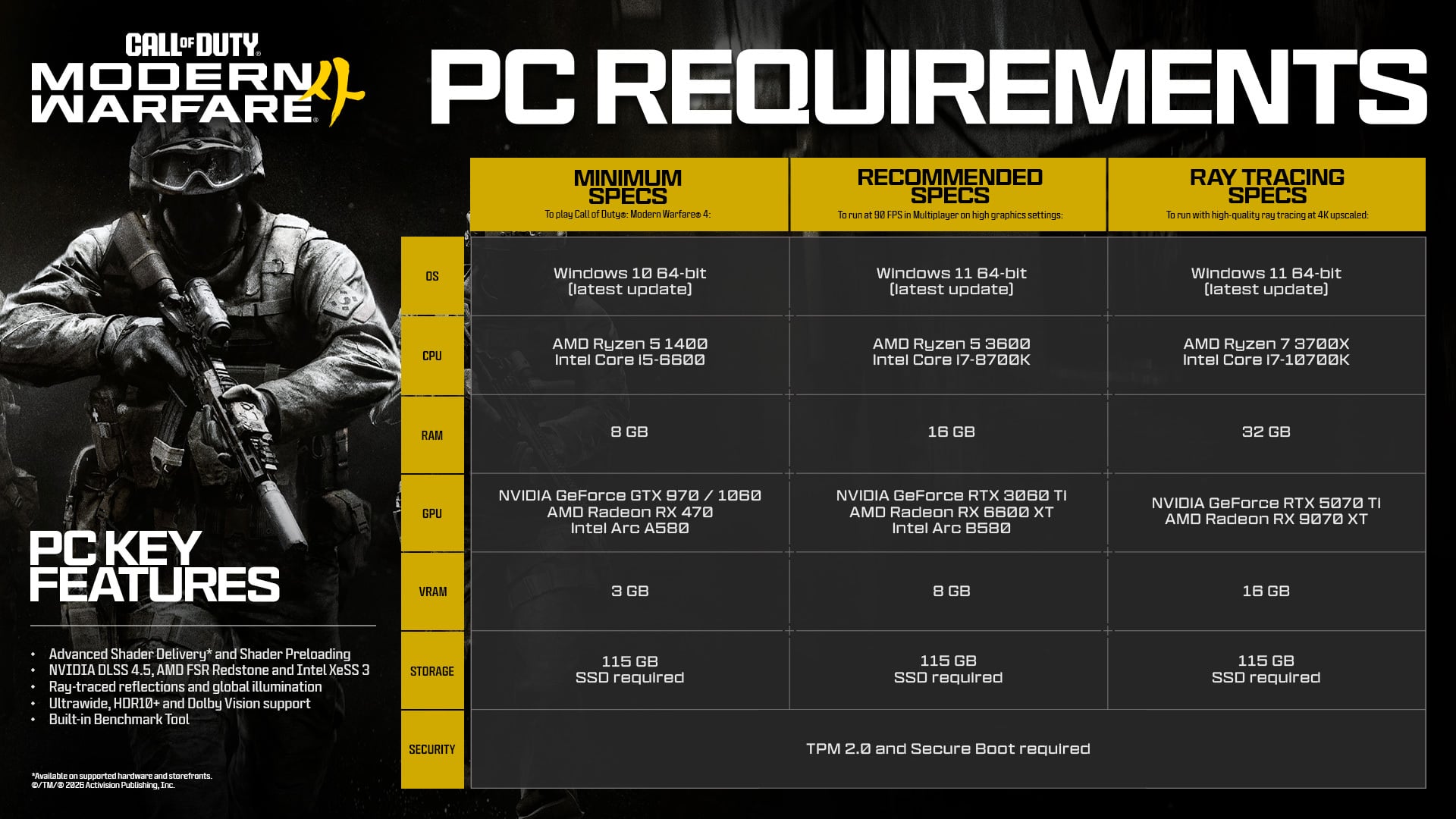
Activision has published its launch PC requirements for MW4. All configurations require an SSD, broadband internet, and DirectX 12 support.| Specification | Minimum | Recommended | Ray Tracing |
|---|---|---|---|
| OS | Windows 10 64-bit | Windows 11 64-bit | Windows 11 64-bit |
| CPU | Ryzen 5 1400 / Core i5-6600 | Ryzen 5 3600 / Core i7-8700K | Ryzen 7 3700X / Core i7-10700K |
| RAM | 8 GB | 16 GB | 32 GB |
| AMD GPU | Radeon RX 470 | Radeon RX 6600 XT | Radeon RX 9070 XT |
| NVIDIA GPU | GeForce GTX 970 / 1060 | GeForce RTX 3060 Ti | GeForce RTX 5070 Ti |
| Intel GPU | Intel Arc A580 | Intel Arc B580 | Not listed |
| VRAM | 3 GB | 8 GB | 16 GB |
| Storage | 115 GB SSD | 115 GB SSD | 115 GB SSD |
The Recommended configuration targets roughly 90 FPS in Multiplayer at High settings. The Ray Tracing configuration is intended for high-quality Ray Tracing at upscaled 4K.
PC players also need TPM 2.0 and Secure Boot enabled. If either feature is disabled, you may not be able to play Modern Warfare 4 online.
See our MW4 TPM 2.0 and Secure Boot guide if you need to check or enable them before launch.
Intel Arc GPUs also require Resizable BAR, while supported Intel and AMD processors need the AVX instruction set.
MW4 Preload Not Showing? Try These Fixes
If Modern Warfare 4 does not show an install or preload button, first make sure the preload is actually available for your platform.As of October 10, October 15 at 9:00 AM PT is confirmed specifically for PC. Console preload dates have not yet been announced.
If your preload should already be available, try the following:
- Confirm that you own the digital game. The confirmed PC preload applies to players who digitally pre-purchased Modern Warfare 4.
- Check the correct product. Open the full Modern Warfare 4 game rather than the expired MW4 Beta application.
- Restart Steam, Battle.net, or the Xbox app. This can force your library to refresh.
- Sign out and back into your platform account if your purchase is not appearing.
- Update your launcher or console system software.
- Check your storage. PC requires 115 GB of available SSD space.
- Check your installation drive. MW4 requires an SSD on PC.
- Verify that the purchase was made on the account you are currently using.
- Enable automatic updates so launch patches can download before you play.
- Restart your PC or console if the preload still does not appear after its confirmed release time.
If you are on PS5, Xbox Series X|S, or Nintendo Switch 2 before Activision announces console preload timing, a missing preload button does not necessarily mean there is a problem.
MW4 Preload FAQ
When can I preload Modern Warfare 4?
PC preload begins on October 15 at 9:00 AM PT for digital purchases on Xbox on PC, Battle.net, and Steam. Console preload times have not yet been announced.When does MW4 Campaign Early Access start?
Campaign Early Access starts on October 16, 2026 for eligible digital preorders and pre-purchases of the Standard Digital Edition or Vault Edition. No exact start hour has been confirmed.When does MW4 DMZ Early Access start?
DMZ Early Access begins on October 20, 2026 for eligible digital preorders on every launch platform. Activision has not announced a specific unlock hour.Do you need the Vault Edition to play DMZ early?
No. Both the Standard Digital Edition and Vault Edition qualify for DMZ Early Access on October 20.Can you play Modern Warfare 4 Multiplayer early?
No Multiplayer Early Access has been announced. Multiplayer is scheduled for the full game launch on October 23.When does Modern Warfare 4 release?
Modern Warfare 4 releases on October 23, 2026. Activision has confirmed a midnight local-time release for the full PC game.How much storage does MW4 need?
The official PC specifications require 115 GB of SSD storage. Actual download size may differ, and additional space may be required for updates.Can I preload MW4 on PS5?
PS5 supports the full Modern Warfare 4 release and digital preorders receive Campaign Early Access, but Activision has not yet announced the PS5 preload date or time.Can I preload MW4 on Xbox Series X|S?
Xbox Series X|S is a supported MW4 platform, but the console preload start time has not yet been announced.Can I preload MW4 on Nintendo Switch 2?
Modern Warfare 4 launches on Nintendo Switch 2 and eligible digital preorder players receive Campaign and DMZ Early Access. A specific Switch 2 preload time has not yet been announced.Is Modern Warfare 4 on Xbox Game Pass?
No. Modern Warfare 4 will not be available through Xbox Game Pass at launch. You need to purchase the game to play at launch.Does MW4 support Xbox Play Anywhere?
Yes. Modern Warfare 4 supports Xbox Play Anywhere, allowing an eligible Xbox digital purchase to work across Xbox Series X|S and Xbox on PC.Do I need TPM 2.0 and Secure Boot for MW4?
Yes. PC players need TPM 2.0 and Secure Boot enabled to play Modern Warfare 4. Other security measures may also be enforced.Does the MW4 Beta download count as the launch preload?
Do not assume it does. The Beta used a separate application, while the full purchased PC game has its own launch preload beginning October 15. Check the full Modern Warfare 4 product in your launcher.What is Advanced Shader Delivery?
Advanced Shader Delivery is the launch version of the system previously called Shader Preloading. It delivers precompiled shaders ahead of time to reduce the amount of preparation needed after starting MW4.Do I need the Xbox PC app if I bought MW4 on Steam or Battle.net?
Not to play the game. Activision recommends installing the Xbox PC app if you want to use Advanced Shader Delivery on a supported PC setup.
Top 50
Get your MW4 rewards now.