1

Select your desired badges

Safe Our boosters play exclusively in normal matches and never use exploits, bots, or cheats.
BADGE CATEGORIES
SELECT BADGES
  • 20 Kills Badge (Legend's Wake)
    i
    $0.00
  • 4000 Damage Badge
    i
    $0.00
  • 20 Kills + 4000 Damage Badge Bundle
    i
    $0.00
  • 2000 Damage Badge
    i
    $0.00
  • 2500 Damage Badge
    i
    $0.00
  • 3000 Damage Badge
    i
    $0.00
  • Apex Predator
    i
    $0.00
  • Assassin I
    $0.00
  • Assassin II
    $0.00
  • Assassin III
    $0.00
  • Assassin IV
    $0.00
  • Deadeye
    i
    $0.00
  • Double Duty
    i
    $0.00
  • Flawless Victory 1
    i
    $0.00
  • Flawless Victory 2
    i
    $0.00
  • Headshot Hotshot
    i
    $0.00
  • Hot Streak
    i
    $0.00
  • No One Left Behind
    i
    $0.00
  • Rapid Elimination
    i
    $0.00
  • Reinforce Recall
    i
    $0.00
  • Shot Caller
    i
    $0.00
  • Squad Wipe
    i
    $0.00
  • The Legacy Continues
    i
    $0.00
  • Triple Triple
    i
    $0.00
  • Decked Out
    $0.00
  • Fully Kitted
    i
    $0.00
  • Group Theatrics 1
    i
    $0.00
  • Group Theatrics 2
    i
    $0.00
  • Group Theatrics 3
    i
    $0.00
  • Long Shot
    i
    $0.00
  • Master of All
    i
    $0.00
  • No Witnesses
    i
    $0.00
  • Team Work 1
    i
    $0.00
  • Team Work 2
    i
    $0.00
  • Team Work 3
    i
    $0.00
  • Team Work 4
    i
    $0.00
  • Well-rounded
    i
    $0.00
  • Win Streak I
    i
    $0.00
  • Win Streak II
    i
    $0.00
  • Win Streak III
    i
    $0.00
  • Win Streak IV
    i
    $0.00
๐Ÿ›’ Cart 0
    Your cart is empty.
    2

    ACC SHARED OR SELF-PLAY

    Number of boosters
    (+250% per booster)

    3

    Select platform

    4

    Select region

    optional features

    STREAMING (+5$ or 25%)

    Our booster will stream your order on Twitch or YouTube for you to watch. Stream will be made anonymous. Minimum streaming price is $5.

    Pay Half Now, Half At 50%

    For orders that are over $500, you're able to pay 50% upfront and 50% when the booster reaches 50% of the order progress.

    Express Order (+30%)

    Our system will prioritize your orders over non-express orders and boosters will play more games than non-express orders to achieve faster completion.

    APPEAR OFFLINE (FREE)

    Our booster will appear offline/invisible to your friends so nobody can see you as online.

    checkout

    approximate
    completion time

    hours

    active boosters

    44

    specific booster

    STORE CREDIT (0$)

    total

    ...

    ...

    USD $
    USD $
    EUR €

    Login and checkout to get
    in cashback* !

    4.9 / 5 23,360 customer reviews

    VETTED PROFESSIONAL BOOSTERS

    Hand-picked boosters for every service


    FAST STARTING TIMES

    Average starting time: 11 minutes


    DEDICATED DAILY BOOSTING

    Up to 9 hours of boosting per day

    Apex Legends Badge Boosting FAQ

    Apex Legends Badge Boosting helps players unlock selected achievement badges, including 20 Kill (Legend's Wake), 2K, 2.5K, 3K, and 4K Damage badges (Legend's Wrath), Triple Triple, Assassin, and Squad Wipe. Choose the badges you want in the order configurator, then select your preferred Legends on your order page. Our Predator-level boosters help complete the required challenges on PC, Xbox, and PlayStation.
    Select the badges you want in the order configurator, whether that is a single 4K Damage badge, a 20 Kill badge, or a bundle. Complete checkout, then choose your preferred Legends in the โ€œSPECIFIC LEGENDSโ€ section of your tracking page. Your assigned booster will work toward the selected unlocks while you follow progress and communicate through your dashboard.
    The Legend's Wrath damage badges are awarded for dealing 2,000, 2,500, 3,000, or 4,000 damage in a single eligible match with a Legend. The 4K Damage badge is the highest tier. Choose the damage threshold you want to unlock in the badge boosting configurator.
    The Legend's Wake badge, also known as the 20 Bomb, requires 20 kills in one eligible match with the selected Legend. Our professional Apex Predator boosters can work toward this challenging unlock on the Legend you choose.
    Yes. Select the 20 Kill + 4K Damage bundle to order both popular badges together instead of purchasing them separately. After checkout, specify the Legends you want the badges on through your order dashboard.
    Badge eligibility depends on the game mode and the current playlist rules. Some special modes and takeovers may not award standard 20 Kill or damage badges, even if you meet the requirements. Our boosters complete badge challenges in eligible matches so the selected unlocks count toward your account.
    If you order a badge, for example, a 3K damage badge and our booster reaches a 4K damage badge, the upgrade is provided free of charge.
    Yes. After checkout, your personal order tracking page includes direct chat with your booster. You can discuss your badge selections, Legend preferences, and order progress in one place.
    Yes. Enable Streaming in step 4 of the order configurator to watch your booster attempt the selected Apex Legends badge challenges live.
    Yes, we provide this feature free of charge to maintain your privacy.
    Yes. After checkout, open your personal order tracking page and go to โ€œSPECIFIC LEGENDSโ€ to select the Legends you want for your badge unlocks. Legend-specific badges are displayed on the corresponding Legend's banner.
    Most boosts start within 30 minutes, unless there is a high workload that day.
    Completion time depends on the badges you select, their requirements, and the number of Legends included in your order. You can check the approximate completion time in the order configurator before purchasing.
    The risk is low. Our professional boosters use VPNs to mimic your IP and conceal that a boost is in progress.
    Yes, every boost comes with a guarantee.
    Yes, all boosters are carefully vetted professionals with years of experience.
    Yes. Your personal dashboard lets you follow the progress of your selected badge unlocks, review order updates, and communicate directly with your booster.
    We accept PayPal, all major credit cards, Skrill, Klarna, iDeal, Alipay, Neteller, Paysafecard, and Bitcoin.

    Don't just take our word for it, see what our customers say about us

    How does Apex Legends badge boosting work?

    Apex Legends Badge Boosting helps players unlock rare and difficult badges without spending countless hours attempting high-risk challenges. Some of the most popular badges include the 20 Kill badge, awarded for getting 20 kills in a single match, and the 4K Damage badge, earned by dealing 4,000 damage in one game. We also offer 2K, 2.5K, and 3K Damage badges, Triple Triple, Squad Wipe, Assassin, and many other badge and achievement unlocks.

    Our professional Apex Predator players have completed these challenges many times across multiple Legends and can help you unlock the exact badges you want. You can order a single badge, multiple badge unlocks, or a popular 20 Kill + 4K Damage bundle, then choose the Legends you want them completed on. Our Apex Legends badge boosting service is available on PC, Xbox, and PlayStation, with secure account handling, flexible scheduling, and real-time order tracking.
    Apex Legends Badge Boosting
    Apex Legends Character 2

    Security of your account is our highest priority

    STATE OF
    THE ART SSL

    Our Apex Legends boosting platform uses state-of-the-art SSL encryption to protect all data between you and our servers.

    VPN PROTECTED
    BOOSTING

    When our pros log in to your account, they use advanced VPNs to mimic your IP, making it appear as if you are playing yourself.

    IDENTITY
    PROTECTION

    Our boosters never interact with your friends and always use the appear offline feature to maintain full anonymity.

    Customize Your Apex Legends Badge Boost

    Build a badge boosting order around the exact rewards you want to unlock. Choose a single badge such as 20 Kills or 4K Damage, combine multiple damage badges, or select a bundle such as 20 Kill + 4K Damage. You can also choose which Legends should receive the badges, making it easy to customize your account progression and banner setup around your favorite characters.

    Our next-generation Apex Legends badge boosting platform gives you full control after checkout. You can communicate directly with your booster, schedule preferred play times, pause or resume the order, track progress toward each selected badge, and watch your booster live if you activate streaming. If you have specific instructions or badge priorities, our team will gladly help accommodate them.

    What happens after I order Apex badge boosting?

    Moments after payment, youโ€™ll receive an email confirmation and access to your personal dashboard, where you can chat directly with your booster and follow the progress of your selected badge order in real time. This gives you a simple way to stay updated while your booster works toward the achievements you selected.

    You can also manage important order details from your dashboard, including login credentials, region, platform, scheduling, and badge preferences. Pause or resume the order whenever needed, review progress updates, and communicate with your booster throughout the process. Our platform is continuously improved to give you even more flexibility and control.

    Loyalty program designed for you

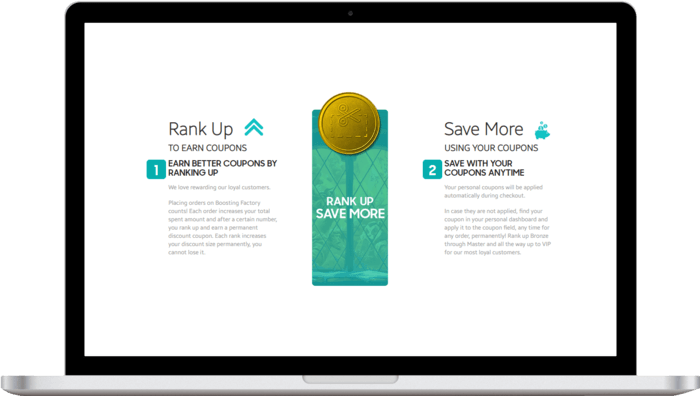
    Customer satisfaction is our top priority. Returning customers show weโ€™re doing it right, and our loyalty program rewards continuous purchases.

    Each purchase counts towards your total, helping you rank up internally and earn bigger permanent discount coupons. Additionally, referring a friend rewards both of you with $5 store credit after their first purchase.
    Boosting savings

    Need help?

    get in touch

    approximate
    completion time

    2 hours

    active boosters

    44

    store credit (0$)

    Total:...

    USD $
    USD $
    EUR €
    Total
    You've blocked notifications. Please click on the lock pad icon in the address bar, then set "Notifications" permission to "Ask(default)". Refresh the page.
    Notifications are already enabled! If you don't see them check your browser and OS settings again.