
This guide covers Doctrine’s abilities, perk choices, Ultimate, and release date, with practical starting tips for his Hero Trial. The gameplay advice below is based on his revealed kit, rather than an established ranked meta.

Overwatch Doctrine Release Date and Hero Trial
Doctrine releases on October 6, 2026, with Overwatch Season 5. Before that, players can try him during a limited Hero Trial running from September 12 through September 14.The trial is available to players at home, so you do not need to attend BlizzCon to try him. It is an early preview, separate from his full Season 5 release.
- Reveal: September 12, 2026, at BlizzCon.
- Hero Trial: September 12–14, 2026.
- Full release: October 6, 2026.
- Role: Support.
- Sub-role: Survivor.
These dates come from Blizzard’s official BlizzCon announcement. Ability balance and perk values may change between the trial and launch.
If you are also collecting the event rewards, our Overwatch BlizzCon rewards guide covers that side of the weekend.
Doctrine’s Abilities Explained
Doctrine’s kit combines a weapon that can heal or deal damage, an ally buff, and a movement ability. Infuse modifies his next eligible action, so the order in which you use your buttons matters.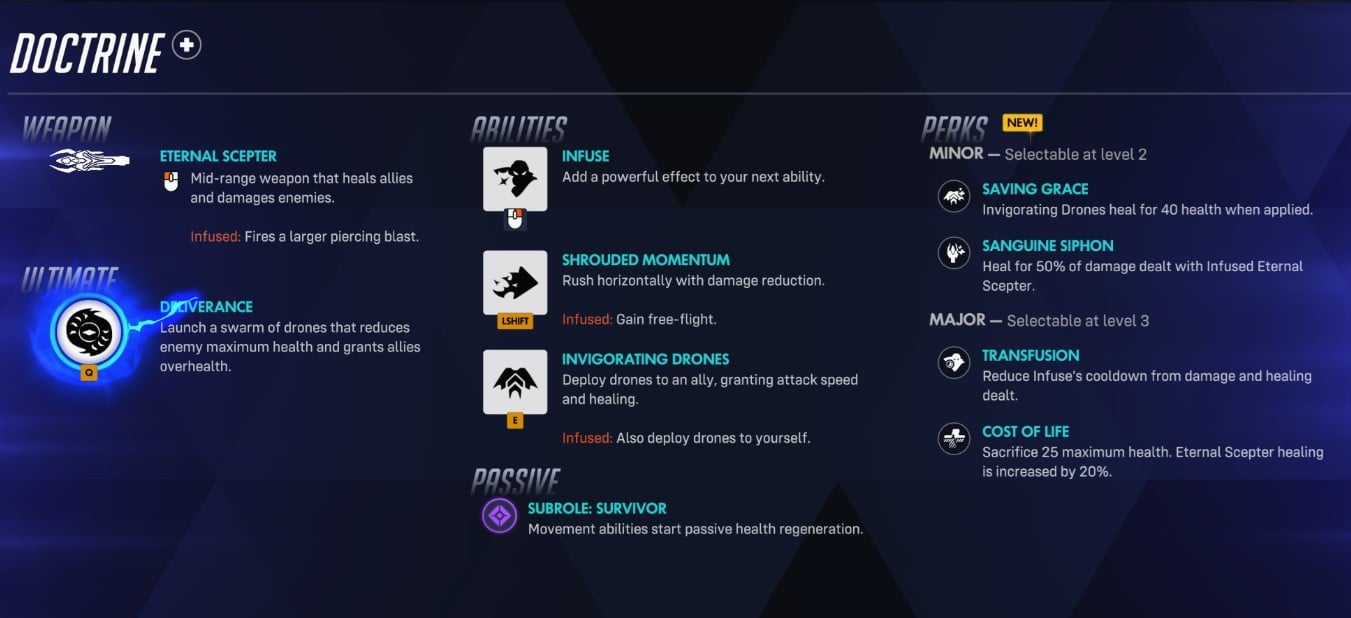
Here is how his standard abilities compare with their enhanced versions.
| Ability | Standard Effect | Infused Effect |
|---|---|---|
| Eternal Scepter | A mid-range weapon for healing teammates or damaging opponents. | Produces a bigger shot that pierces targets. |
| Shrouded Momentum | A horizontal rush with reduced incoming damage. | Allows free flight. |
| Invigorating Drones | Gives a teammate healing and increased attack speed. | Applies drones to Doctrine as well. |
Which Doctrine Ability Should You Infuse?
The main decision is what your team needs over the next few seconds. Based on the trial kit, these are useful starting rules for choosing an enhanced ability.Infuse Eternal Scepter When Targets Line Up
Look for moments when several players share a narrow lane. A piercing shot has a clearer purpose there than when you are firing at one isolated opponent.Do not force a dangerous angle just to line up more targets. If stepping out exposes you to the enemy team, keeping a safer position is usually the better trade.
Infuse Shrouded Momentum to Reach a Better Position
Use the flight option when height solves a problem. That might mean escaping pressure, reaching a ledge, or finding an angle where you can see teammates who have moved out of sight.Choose your destination before taking off. Flying into open space without nearby cover can leave you easy to track once the movement ends.
Infuse Invigorating Drones When Both You and an Ally Can Benefit
This is a sensible option to test during an active fight where you and your teammate can keep contributing. Before committing it, check whether you are likely to need enhanced movement instead.For the ally target, look beyond whoever has the lowest health. A teammate who is already attacking from a useful position may make better use of the offensive buff than someone retreating behind a wall.
- Several targets in a lane: consider the enhanced Scepter shot.
- You need height or an escape route: consider enhanced movement.
- You and an ally can fight safely: consider enhanced drones.
A common habit to avoid is activating Infuse before deciding what comes next. Make the choice first, then use the action you intended to enhance.
How Doctrine’s Deliverance Ultimate Works
Deliverance sends out a drone swarm that lowers enemy maximum health while giving allies overhealth. Its defining feature is the effect on the enemy’s health ceiling.That is different from simply removing some current health. For illustration, reducing a hypothetical 500 maximum-health target to 400 would lower its health cap by 100. Those numbers explain the mechanic, not Deliverance’s confirmed strength or duration.
Our starting recommendation is to use Deliverance when teammates are ready to follow up. A health advantage is more useful when your team can immediately pressure the affected enemies.
- Before casting: check that your team can actually join the fight.
- During the Ultimate: call a target so teammates focus their pressure.
- When fighting against it: consider giving up space instead of committing to a close fight.
Avoid assuming that a high-health Tank automatically becomes an easy elimination. Positioning, defensive abilities, and your team’s follow-up still decide whether the Ultimate produces a kill.
Doctrine’s Perks and Suggested Starting Build
Doctrine chooses a Minor Perk at level 2 and a Major Perk at level 3. His options let you adjust immediate healing, personal sustain, Infuse availability, or Scepter healing.| Perk | Tier | Effect |
|---|---|---|
| Saving Grace | Minor | Adds an immediate 40-health heal when Invigorating Drones are applied. |
| Sanguine Siphon | Minor | Restores health equal to 50% of the damage your Infused Eternal Scepter deals. |
| Transfusion | Major | Dealing damage and healing shortens Infuse’s cooldown. |
| Cost of Life | Major | Trades 25 maximum health for 20% more Eternal Scepter healing. |
Starting Recommendation: Saving Grace and Transfusion
For your first matches, we suggest trying Saving Grace with Transfusion. This gives you a straightforward way to help teammates while encouraging you to practice the different Infuse options.Treat this as a learning setup, not a proven best build. Once you are comfortable with his basic decisions, compare the alternatives in situations where their strengths matter.
When to Try Sanguine Siphon
Consider Sanguine Siphon when you can consistently land enhanced shots and need more personal sustain. It is less appealing if pressure forces you to spend most of your attention keeping allies alive.Watch what happens in your own matches: are those offensive opportunities keeping you alive, or are you chasing them while teammates need help?
When to Try Cost of Life
Cost of Life is worth testing when you have safe positions and spend much of the fight healing with your weapon. The important cost is your smaller margin for surviving incoming damage.Also note the wording: the bonus applies to Eternal Scepter healing. It is not a blanket increase to every healing effect in Doctrine’s kit.
Doctrine Mistakes to Avoid
His flexible kit gives you several ways to solve a problem, but it also gives you several ways to spend the wrong resource. Start by watching for these mistakes:- Using Infuse without a plan. Decide whether the next action is for pressure, positioning, or support before activating it.
- Buffing someone who cannot attack. Check the teammate’s position and target access before sending drones.
- Flying without a landing spot. Pick cover or a useful ledge before leaving the ground.
- Chasing damage while allies collapse. An offensive opportunity is not always your most urgent job.
- Using Deliverance after teammates have disengaged. Coordinate the push while they can still follow up.
- Choosing Cost of Life while already struggling to survive. Extra output helps less if you spend more time returning from spawn.
For your first few games, focus on one question after each death: could a different Infuse choice have kept me useful in that fight? That gives you something specific to improve beyond simply trying to heal more.
OVERWATCH RANK BOOSTING
Get Help Reaching Your Target Rank
Working toward a higher Competitive rank? Explore Boosting Factory’s Overwatch rank boosting options and choose the goal that fits your climb.
Explore Overwatch Rank Boosting
Who Is Doctrine, and Why Does Doomfist Need Him?
Doctrine is Hero 54 and an ally of Doomfist. His introduction connects him to Watchpoint: Grímsvötn, the Icelandic prison where Doomfist breaks him free.
That location also becomes a new Escort map. Doctrine’s arrival ties into the closing chapter of the Reign of Talon story in Season 5, giving his reveal a direct role in the ongoing conflict.
For players learning him, though, the immediate challenge is his decision-making. Practice choosing the right Infuse effect, match your drone target to the fight, and save Deliverance for a moment your team can use.


Top 500
Get the rank you deserve, today.