Wondering if you need to buy Battlefield 6 or whether your Game Pass subscription covers it? Battlefield 6 is coming to Xbox Game Pass on October 13, 2026, with access through Game Pass Ultimate and PC Game Pass. The full game will be available on Xbox Series X|S, Windows PC, and supported cloud devices. Here's which subscriptions work, how to start playing, and what EA Play rewards you can claim.
| TABLE OF CONTENTS Battlefield 6 Game Pass Guide Jump to the section you're interested in: | ||||||||||
|
Is Battlefield 6 on Xbox Game Pass?
Yes, Battlefield 6 officially joins Xbox Game Pass on October 13, 2026. Microsoft confirmed that the game will be included with Xbox Game Pass Ultimate and PC Game Pass, giving eligible subscribers access without buying a separate copy.However, not every Game Pass subscription includes Battlefield 6. If you're using Game Pass Essential or Premium, you won't get access through those plans at the announced launch.
Here's the subscription breakdown:
| Subscription | BF6 Included? | Where You Can Play |
|---|---|---|
| Game Pass Ultimate | Yes, October 13 | Xbox Series X|S, PC, Cloud |
| PC Game Pass | Yes, October 13 | Windows PC |
| Game Pass Premium | No | Not included in this plan |
| Game Pass Essential | No | Not included in this plan |
The important difference is that Game Pass Ultimate covers console, PC, and cloud access, while PC Game Pass is designed for Windows players. Both eligible plans also include standard EA Play membership benefits.
If you already subscribe to one of these plans, you won't need to upgrade to EA Play Pro just to play the standard edition of Battlefield 6.
When Did Battlefield 6 Come to Game Pass?
Battlefield 6 has two different release dates worth knowing. The original game launched on October 10, 2025, while its Xbox Game Pass release is scheduled for October 13, 2026.That means Battlefield 6 is joining Game Pass just over one year after its original launch. This is not a new Battlefield game or a separate version. It's the existing full game becoming available through Microsoft's subscription service.
Microsoft confirmed the date in its official October 2026 Xbox Game Pass announcement.
Before this addition, PC players could already access the Battlefield 6 Phantom Edition through EA Play Pro. The October 13 update introduces a new subscription option for Xbox and PC players who want to experience the standard game.
What Platforms Can You Play Battlefield 6 on Through Game Pass?
Battlefield 6 supports PC, Xbox Series X|S, and PlayStation 5, but its Game Pass availability is different from its general platform support.The Game Pass version covers Xbox Series consoles, Windows PCs, and cloud streaming on compatible devices. Here's how it works for each platform.
| Platform | Game Pass Access | Details |
|---|---|---|
| Xbox Series X | Yes | Native installation with Ultimate |
| Xbox Series S | Yes | Native digital installation with Ultimate |
| Windows PC | Yes | Ultimate or PC Game Pass |
| Cloud Gaming | Yes | Ultimate on supported devices and regions |
| Xbox One | Cloud only | No native BF6 version; compatible cloud streaming may be available |
| PlayStation 5 | No | Game Pass does not provide PS5 access |
Can You Play Battlefield 6 on Xbox One Through the Cloud?
Battlefield 6 does not have a native Xbox One version, so you cannot install it directly on Microsoft's older console. However, cloud gaming can allow supported Xbox One devices to stream eligible Xbox Series games, provided you have the required subscription and access in your region.Keep in mind that cloud gaming quality depends on your internet connection. A stable connection and low latency are especially important in a fast-paced multiplayer shooter like Battlefield 6.
Does Battlefield 6 Support Crossplay?
Yes. Battlefield 6 supports crossplay between Xbox Series X|S, PC, and PlayStation 5. Game Pass players can join friends who purchased the game separately on supported platforms.Your subscription doesn't place you in a separate matchmaking pool. For more information about crossplay settings and carrying progress between platforms, read our Battlefield 6 Crossplay and Cross-Progression Guide.
How to Download and Play Battlefield 6 With Game Pass
Once Battlefield 6 becomes available in the Game Pass library, getting started should be straightforward. The exact steps depend on whether you're playing on an Xbox console, Windows PC, or through cloud gaming.On Xbox Series X|S
- Make sure you have an active Xbox Game Pass Ultimate subscription.
- Open the Xbox Store or Game Pass library on your console.
- Search for Battlefield 6.
- Select the included Game Pass version and choose Install.
- Once the download and updates finish, launch the game and sign in to your EA Account if prompted.
You'll need an internet connection for online multiplayer and game updates. Since Battlefield 6 has large maps and detailed environments, make sure you have enough free storage before downloading.
On Windows PC
- Subscribe to PC Game Pass or Game Pass Ultimate.
- Install the Xbox app and the EA app on your Windows PC.
- Sign in to the Xbox app with the Microsoft account that holds your subscription.
- Find Battlefield 6 in the Game Pass library and follow the installation prompts.
- Link your Xbox and EA accounts if requested, then download and launch the game.
The EA app is important because EA Play benefits on Windows are managed through EA's platform. If Battlefield 6 doesn't appear as included, confirm that your Microsoft and EA accounts are correctly connected and that you're using the account with the active subscription.
EA provides additional instructions in its EA Play and Xbox Game Pass support guide.
Through Xbox Cloud Gaming
- Make sure your Game Pass Ultimate subscription is active.
- Open Xbox Cloud Gaming on a supported device or through the Xbox app.
- Sign in with your Microsoft account.
- Find Battlefield 6 in the cloud library once it becomes available.
- Select Play to start streaming without a local installation.
Cloud support depends on your device, location, and internet connection. Availability and streaming performance may differ between regions.
What EA Play Rewards Do Battlefield 6 Game Pass Members Get?
One of the useful extras included with Game Pass Ultimate and PC Game Pass is EA Play membership. Alongside access to eligible EA games, EA Play provides Battlefield 6 players with cosmetic rewards, XP boosts, and discounts on supported digital purchases.The October 2026 Game Pass announcement specifically highlights the EA Play Deployment Pack, a Season 5 EA Play Pack, and recurring seasonal rewards.
EA Play Deployment Pack
The EA Play Deployment Pack contains cosmetics and temporary XP boosts that can help with early progression.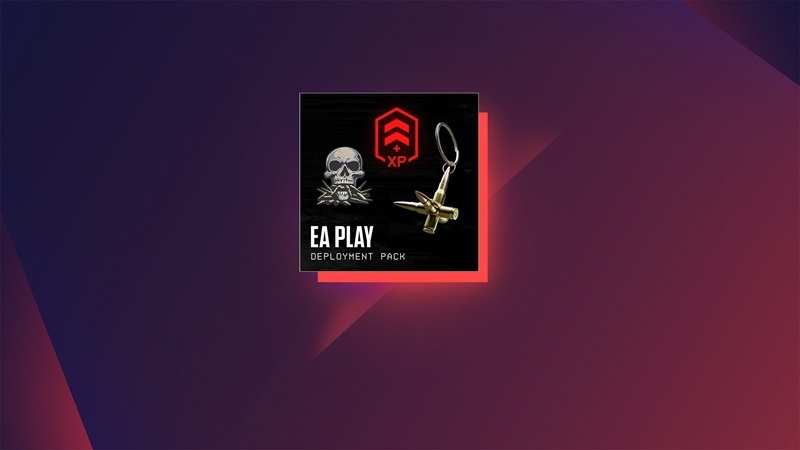
According to EA, the pack includes the following rewards:
| Reward | Type |
|---|---|
| Double Tap | Weapon Charm |
| Lock and Load | Player Card Background |
| Death Bringer | Vehicle Decal |
| 60-Minute Career XP Boost | XP Booster |
| 60-Minute Hardware XP Boost | XP Booster |
| 30-Minute Career XP Boost | XP Booster |
| 30-Minute Hardware XP Boost | XP Booster |
Career XP boosts help with your overall account progression, while Hardware XP boosts focus on weapon and vehicle mastery. These rewards are useful if you're starting Battlefield 6 for the first time and want to begin unlocking equipment faster.
To get the most value from your tokens, check our Battlefield 6 XP Boosters Guide before activating them.
Seasonal EA Play Packs
EA Play members can also receive recurring seasonal rewards for Battlefield 6. These are separate from the initial Deployment Pack and may change as new seasons arrive.For the October 13, 2026 Game Pass release, Microsoft specifically mentions the Season 5 EA Play Pack. The available contents and claim conditions should be checked in the current EA Play benefits section.
Because these packs are linked to individual seasons, don't assume that the same cosmetics will remain available permanently. Check the active reward offers when you log in.
EA Play Discounts
Game Pass Ultimate and PC Game Pass subscribers also receive a 10% EA Play discount on eligible EA digital purchases. This can include selected games, Battlefield Coins, Battle Pass purchases, and other supported add-ons.Ultimate subscribers can use eligible discounts through the Microsoft Store or EA app Store. PC Game Pass members can use their EA Play discount through the EA app Store. Terms and exclusions apply.
For the official reward details and membership terms, see the Battlefield EA Play page.
Battlefield 6 on Game Pass vs. EA Play Pro: What's the Difference?
Game Pass and EA Play Pro both provide ways to access Battlefield 6 without purchasing a separate permanent copy, but they don't include exactly the same content.The main difference is the game edition. Game Pass provides access to the standard Battlefield 6 experience, while EA Play Pro includes the more expensive Phantom Edition on PC.
| Feature | Game Pass Ultimate / PC | EA Play Pro |
|---|---|---|
| Full Battlefield 6 Game | Yes, from October 13 | Yes |
| Game Edition | Standard | Phantom Edition |
| EA Play Deployment Pack | Available to eligible members | Included with membership |
| Recurring EA Play Rewards | Yes, where eligible | Yes |
| Phantom Pack Cosmetics | Not included | Included |
| Battlefield Pro Token | Not included | Included with Phantom Edition |
| Platform Access | Xbox / PC depending on plan | PC through EA app |
The Phantom Edition includes additional soldier skins, weapon cosmetics, XP boosts, and a Battlefield Pro Token. These extras are not automatically unlocked just because you have Game Pass.
For most players who simply want to try Battlefield 6, the included standard edition should be enough. If you specifically want the Phantom Edition extras, EA Play Pro offers a different package on PC.
Remember that neither Game Pass nor EA Play Pro gives you permanent ownership of the game. Your access depends on maintaining the required subscription and the title remaining available through that service.
Is Battlefield 6 Worth Playing on Game Pass?
If you're already paying for Game Pass Ultimate or PC Game Pass, Battlefield 6 is an easy game to try once it joins the library. You can explore its main modes without paying the full standalone purchase price.Battlefield 6 offers several ways to play, depending on whether you prefer large-scale multiplayer battles, solo missions, or custom experiences.
- Conquest: Large battles focused on controlling objectives across the map.
- Breakthrough: Attack or defend sectors in intense, objective-based matches.
- Rush: A classic Battlefield mode built around destroying or defending objectives.
- Single-Player Campaign: A story-driven military campaign with missions across different locations.
- Battlefield Portal: Custom experiences and community-created gameplay.
Beyond these modes, Battlefield 6 features career ranks, weapon mastery, vehicle progression, assignments, and cosmetic unlocks. If you enjoy games with long-term progression, there is plenty to work toward.
If you're just starting out, our Battlefield 6 Complete Progression Guide explains how ranks, mastery, assignments, and unlocks work together.
You can also save time by getting professional help with account levels, weapon mastery, and difficult challenges.
BOOSTING FACTORY Spend Less Time Grinding Battlefield 6 Need help unlocking weapons, completing assignments, or leveling your account? Our experienced Battlefield players can help you reach your goals across PC, Xbox, and PlayStation.
Battlefield 6 Game Pass FAQ
Is Battlefield 6 free with Xbox Game Pass?
Battlefield 6 is included with Game Pass Ultimate and PC Game Pass starting October 13, 2026. You don't need to buy the standard game separately while you have an eligible active subscription, but Game Pass itself is a paid service.Can I play Battlefield 6 with Game Pass Premium?
No. Microsoft has announced Battlefield 6 for Game Pass Ultimate and PC Game Pass, not Premium or Essential. You'll need one of the eligible plans or a separate game purchase to play.Is Battlefield 6 included with PC Game Pass?
Yes. PC Game Pass subscribers will be able to download and play Battlefield 6 on Windows starting October 13, 2026. You'll also have access to standard EA Play benefits through the EA app.Can I play Battlefield 6 on Xbox One?
Battlefield 6 does not have a native Xbox One version. However, Xbox Cloud Gaming may allow you to stream the game on supported Xbox One consoles with an eligible subscription, provided cloud access is available in your region.Does Battlefield 6 Game Pass include the Phantom Edition?
No. The announced Game Pass access is for the standard Battlefield 6 experience. The Phantom Edition, which includes extra cosmetics and a Battlefield Pro Token, is available separately and through EA Play Pro on PC.Can Game Pass subscribers play Battlefield 6 with PlayStation 5 players?
Yes. Battlefield 6 supports crossplay between PC, Xbox Series X|S, and PlayStation 5. Players do not need to use the same store or subscription service to play together, as long as they have access to the game and meet the multiplayer requirements.Will I keep Battlefield 6 if I cancel Game Pass?
No. If you're accessing Battlefield 6 only through Game Pass, canceling your subscription will eventually remove your ability to launch the paid game once your membership expires. You can regain access by renewing an eligible subscription or purchasing the game separately. Your account progression is generally tied to your EA Account.Does Battlefield 6 Game Pass include the Battle Pass?
The standard Game Pass access does not automatically include Battlefield 6's paid Battle Pass or Battlefield Pro. You can use the standard game and its available free progression content, but premium rewards may require a separate purchase or an edition that includes them.Battlefield 6 joining Game Pass makes it easier for new players to experience the game without a separate purchase. Whether you're interested in large multiplayer battles, the campaign, or progressing through weapon unlocks, Game Pass Ultimate and PC Game Pass give you another way to join the fight.

Top 50
Get your Battlefield 6 rewards now.